Scheduled maintenance: updating with a controlled pause
How to prepare, execute, and recover a deployment with planned downtime.
Updated: November 14, 2026
In this scenario, you accept a planned interruption to replace the application and, if necessary, the database structure. It is the most direct approach when downtime fits the agreement with the business.
The visual notice is not the protection: the block must cover the API and every write path. An old tab, integration, job, or webhook may keep trying to operate.
Infrastructure and preparation
- A static maintenance page at the proxy, independent of the application being updated; respond with HTTP 503 and, when appropriate, Retry-After.
- Controlled internal access for validation; never a public parameter that allows bypassing the block.
- An inventory of APIs, jobs, queues, schedulers, webhooks, and integrations that write to the database.
- A verifiable backup, a rehearsed restoration procedure, and an estimate of the migration's actual duration.
- The previous version preserved and a defined recovery procedure for code, configuration, and data.
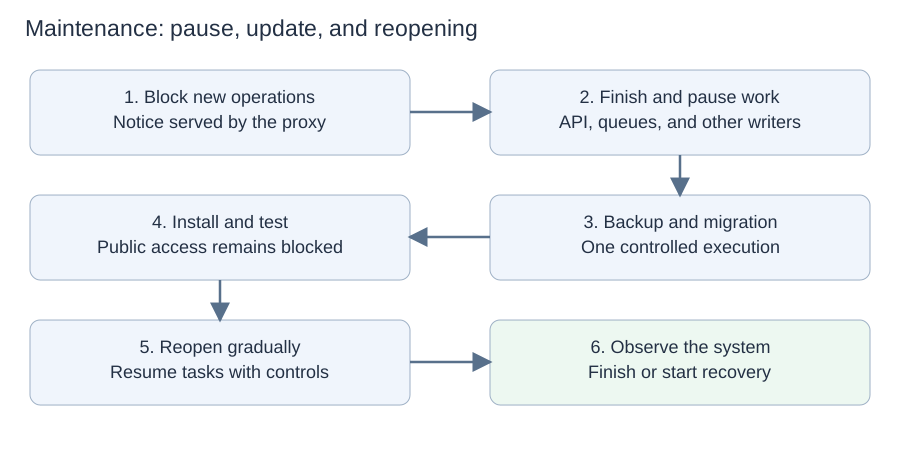
Failures before reopening keep the notice active. Failures after reopening need to account for new legitimate writes.
Complete workflow
- Before the window: perform acceptance testing on the build, rehearse the migration on representative data, and communicate the pause and its estimated duration.
- Block new operations at the proxy. Handle webhooks according to their contract: a temporary error only helps when the provider actually retries; if necessary, receive and store webhooks in a separate service for later processing.
- Drain requests. Pause new jobs and queue consumption, allowing in-progress tasks to finish. If a timeout occurs, investigate before killing a process that may be changing data.
- Confirm that no process is writing to the database and that there are no relevant pending transactions. A blocked website does not guarantee an idle database.
- Create a consistent recovery point using the appropriate strategy for the database. Verify that the backup completed and is accessible.
- Run the migration once through an exclusive pipeline task. Record the steps applied; do not automatically restart without knowing the state.
- Install the new version and corresponding configuration. Check startup, logs, authentication, reads, and business operations.
- Validate writes using controlled test accounts/data. Real charges and notifications require isolation or planned compensation.
- Decide whether to reopen. Release traffic and resume schedulers/consumers in order and with limits to avoid a flood from the accumulated queue.
- Watch errors, latency, the queue, and business metrics. Record the end of maintenance and retain recovery materials for the defined period.
Updating the database
Without active writers, it is possible to make a change incompatible with the old application. That does not make the operation instantaneous or reversible. Adding NOT NULL constraints or indexes, converting types, or processing many records may fail or take time.
In MySQL, various structural operations perform an implicit commit. Do not assume that wrapping the entire migration in BEGIN will let you undo everything with ROLLBACK. Behavior depends on the engine, version, and command; even if one statement completes entirely or has no effect, this does not guarantee that the entire migration sequence can be undone with ROLLBACK.
Failures and recovery by stage
| Stage | Action and limitation |
|---|---|
| Backup or preparation fails, with no change applied | Cancel the release, confirm that the previous version is intact, and reopen. Do not reopen without checking whether any modification occurred. |
| Migration in progress or partially applied | Keep the block in place. Inspect the actual state, locks, and history. Choose continuation/correction or rehearsed recovery; do not blindly retry or kill DDL without analysis. |
| Migration complete, new application does not start | If the database supports the old application, roll back the code. If it does not, fix forward or recover structure/data according to the plan before reopening. |
| Internal test finds an error | Stay in maintenance; return to a compatible point or produce a corrected candidate. New changes require proportional validation. |
| Bug after reopening, without incorrect data | Contain the feature and roll back the application if the database allows it; otherwise, apply a patch or corrective maintenance. |
| Bug wrote incorrect data | Stop the source, identify the time window and records, preserve evidence, and repair selectively. Use history/auditing or a restored copy. |
| Server fails during the window | The notice remains available only if served by surviving infrastructure. Recover the machine or an alternative destination and inspect the database before resuming. |
Why restoring a backup requires care
If all writers have remained stopped since the backup, restoring that point may be viable, accounting for validation data and external effects. After reopening, restoring the entire database may erase valid orders. One option is to restore a separate copy and extract only the necessary records; the procedure must preserve legitimate later changes. External payments and messages are not undone by restoration.
Bugfixes and hotfixes
A regular fix goes into the next window. An urgent fix may use a shorter window, but needs the same version identification, patch testing, and database assessment. Apply it to the affected line and track its incorporation into the main line. Do not reuse an already published tag or silently overwrite the previous package.
When to use it and when to change
This is appropriate when the pause is tolerable and recovery time fits the agreement. If windows become long, frequent, or unpredictable, investigate staged migrations, pipeline improvements, or another strategy. Zero downtime should not be promised in this scenario.
Sources and further reading
- MySQL — Statements that cause an implicit commit
- AWS — Rollback safety
- NGINX — Control and graceful reload
- RabbitMQ — Acknowledgments and redelivery
References consulted on November 2, 2026. The procedures are conceptual models: parameters, commands, and guarantees depend on the technology and need to be rehearsed.
Other articles in the series
Share this article
Sources & further reading
This note is a practical introduction, not a substitute for the original documentation. Check source dates and implementation details before making technical decisions.