One server: releases, current, and switching processes
How to deploy two versions with overlapping processes and traffic control on one server.
Updated: November 14, 2026
Here we keep the files for different versions in separate folders and switch processes with overlap. This is a form of blue-green deployment within one server, without requiring Kubernetes.
current is normally a symbolic link, not an independent folder. Switching this link changes the file path; it does not automatically replace an already running Node.js, Python, or .NET API.
Structure and roles
| Element | Example and responsibility |
|---|---|
| Old release | /app/releases/1.8.0/ — preserved files from the previous application. |
| New release | /app/releases/1.9.0/ — the output of the build that passed acceptance testing. |
| current | Points to the selected release; serves as an operational reference. |
| shared | Uploads and other appropriate persistent data; sensitive configuration through a secure mechanism. Do not mix generated files from incompatible versions. |
| Processes and proxy | Old application on port 3001, new one on 3002; the proxy controls which receives new requests. |
| Database | Shared, remaining compatible with both applications during the transition window. |
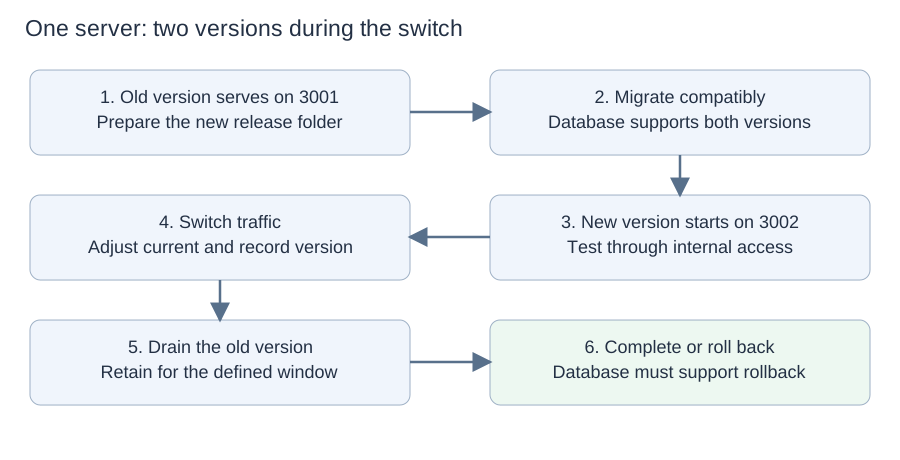
Processes use fixed paths to their releases. The proxy handles the transition; current does not transfer connections.
Complete workflow
- Perform acceptance testing on the build and reserve memory, CPU, and ports for both versions simultaneously. Ensure that a single pipeline execution controls the switch.
- Send the artifact to a new folder and verify its identity. Do not perform a different build or installation for each version without traceability.
- Run an additive/compatible migration once. Assess locks and impact; even adding a column may affect service depending on the operation and database.
- Start the new application on another port, pinned to the absolute path of its release. Disable duplicate scheduled tasks or use election/locking for a single executor when necessary.
- Check readiness and internal routes: database, configuration, authorization, and essential user journeys. Do not consider a process ready simply because it is alive.
- Validate the proxy configuration before applying it. Transfer new connections through the proxy and replace the current link without an intermediate step in which the link is absent. These are coordinated steps: record the outcome of each, because there is no single transaction covering the link, proxy, and process.
- Wait for old requests to finish. Prepare reconnection for WebSockets and streaming, with appropriate waiting limits.
- Watch errors and business indicators. Keep the old version executable during the rollback window and stop its processes when safe.
- Clean up old releases only after the retention period and after considering files still used by clients.
Database: an example of a staged incompatible change
- Add optional nome_completo without removing nome.
- Deploy an intermediate version that still reads nome but keeps both fields consistent for relevant writes.
- Wait for all writers to adopt this version; include jobs and integrations, not just the API.
- Backfill and reconcile existing data with concurrency control to avoid overwriting a recent change with an old value.
- Deploy the version that reads nome_completo, maintaining write compatibility during the rollback window.
- Remove nome only in a later release, after no consumer or rollback version needs it.
Not every change requires two columns. The example illustrates expand-and-contract. Two writes can also fail partially: when they need to be consistent, use the appropriate transaction and check every update path.
Failures and recovery by stage
| Failure | Response |
|---|---|
| Failure to transfer or prepare the release | Do not change the active destination. The old version continues serving traffic. |
| Migration fails | Stop deployment; assess effects on the old service. If the structure or lock affected production, contain the problem and recover the database. |
| New application does not start or fails tests | Keep traffic on the old version. Stop or fix the candidate; record the reason. |
| Proxy switch fails | Keep or restore the known configuration. Check the actual destination; current may differ from the process serving traffic. |
| Bug after transfer | Confirm the old version's health and compatibility, return new connections to it, drain the new version, and adjust current. Do not stop processes before a healthy destination is available. |
| New application corrupted data | Rollback may stop further incorrect writes, but records must be repaired and you must assess whether the old version can read the data already written. |
| Server loss or resource exhaustion | Both versions may go down. Being on the same machine does not provide high availability; plan restoration and capacity. |
Static files, sessions, and different technologies
- Frontend: retain versioned/hashed filenames long enough. An old tab may request a file that does not exist in the new folder. Avoid incompatible caches and do not treat only the HTML page as the entire application.
- Sessions: if stored only in one process's memory, switching may disconnect users. Use appropriate storage or accept and communicate the behavior.
- PHP: per-request runtimes and caches such as OPcache have particular characteristics; paths need to remain consistent within each request. Switching a link does not eliminate every risk of mixing files.
- PM2 in cluster mode can perform a graceful reload, but timeouts may cause a fallback to restart. Gunicorn and other runtimes have their own mechanisms.
- Uploads persist outside the release's disposable folder. Never remove them when cleaning up old versions.
Bugfixes and hotfixes
Each fix produces a new version in another folder, such as 1.9.1. If the old version remains compatible, returning traffic can contain the incident before the patch. If compatibility or capacity for overlap is unavailable, use scheduled maintenance. Propagate fixes to the necessary code lines.
Limits and exit checklist
- Same approved build and verified configuration.
- Readiness, user journeys, logs, and actual destination checked.
- Compatible database and recorded migrations.
- Tested draining, resumption, and rollback plan.
- No duplicate schedulers or persistent files inside disposable releases.
- Do not confuse deployment without downtime with protection against server failure.
Sources and further reading
- Capistrano — Releases and current structure
- NGINX — Control and graceful reload
- PM2 — Cluster mode and reload
- AWS — Rollback safety
References consulted on November 2, 2026. The procedures are conceptual models: parameters, commands, and guarantees depend on the technology and need to be rehearsed.
Other articles in the series
Share this article
Sources & further reading
This note is a practical introduction, not a substitute for the original documentation. Check source dates and implementation details before making technical decisions.